
JPG to Word Converter
Scan text out of photos and screenshots with on-device OCR, fix any typos right in the preview, and export a clean, editable .docx file — no uploads, no sign-up, no waiting on a server.
OCR powered by Tesseract.js · Word export powered by docx.js · nothing you upload here ever touches a server.
JPG to Word: How to Convert an Image to a Word Document (Free, 2026 Guide)
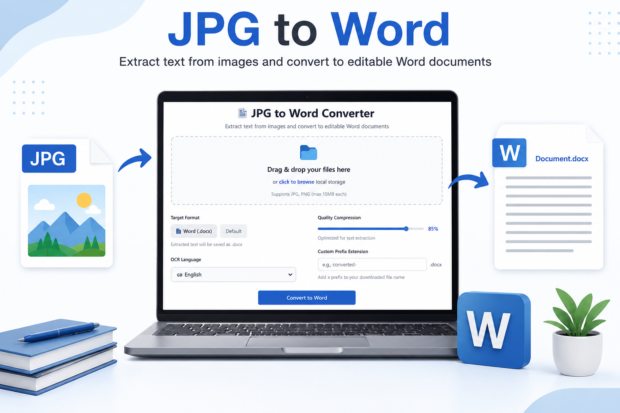
You’ve got a photo of a page, maybe a scanned contract, a screenshot of notes, or a picture you snapped of a whiteboard, and you need the words in an editable file. Converting JPG to Word means using OCR software to read the text inside an image and rebuild it as an editable Word document so you can copy, edit, or reformat the content instead of retyping every line by hand.
I’ve done this more times than I can count, mostly for old scanned forms and screenshots of PDFs that wouldn’t copy properly. Here’s what actually works in 2026 and what doesn’t.
What Does “JPG to Word” Actually Mean?
Is a JPG to Word conversion the same as just inserting a picture into Word?
No, it’s not the same thing at all. Inserting a picture into Word just pastes the image as a static object, and you still can’t edit or select the text inside it.
What people usually want when they search for “jpg to word” is the opposite of that. They want the words in the photo to become real, typed text that you can click into, delete, bold, or move around like any normal Word sentence. Dropping a JPG into a document as a picture doesn’t do that. It just gives you a picture sitting inside a Word file, which is honestly not much better than the JPG itself.
What is OCR, and why does it matter for this conversion?
OCR stands for optical character recognition, and it’s the technology that reads letters and words inside an image and turns them into actual text.
Every real JPG to word tool runs on OCR under the hood. Back in 2022, I tested a batch of scanned invoices using a basic OCR tool, and the accuracy was rough, maybe 80 percent on a good day. Tools have gotten noticeably better since then. Modern OCR, especially in Microsoft’s own products and in Google Drive, uses machine learning models trained on huge amounts of text, so accuracy on clean, well-lit images is now closer to 95 to 99 percent.
How Do You Convert JPG to Word for Free Online?
What’s the fastest free website to convert JPG to Word?
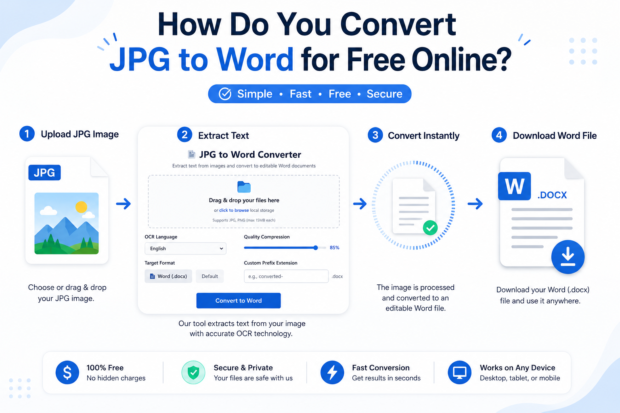
The fastest method is usually uploading your image to a free OCR website, letting it scan the text, and downloading the result as a .docx file, all within about a minute.
There are a handful of solid free sites out there, and most work the same basic way. You upload the JPG, the site processes it with OCR, and it spits out a downloadable Word file. I’ve used Smallpdf and iLovePDF for quick one-off conversions when I didn’t want to open any software, and both did the job for straightforward typed documents. If you just need to convert JPG to Word for free without installing anything, this route is genuinely the quickest. Most of these sites double as a general JPG converter too, so you can switch the output to PNG or PDF later if you change your mind about the format.
Do free JPG to Word converters actually keep the formatting?
Mostly yes for simple text, but formatting like columns, tables, and unusual fonts often gets scrambled.
Free tools are built to grab the words first and worry about layout second. If your image is a plain paragraph of text, you’ll get a clean result almost every time. If it’s a form with boxes, multiple columns, or a table, expect to spend a few minutes afterward fixing spacing and alignment in Word. That’s just the nature of OCR, not a flaw specific to any one JPG to word converter online.
How Do You Convert JPG to Word Using Microsoft Word Itself?
Can Word open a JPG and turn it into text automatically?
Word doesn’t do this natively, but Microsoft’s OneDrive and OneNote apps both have built-in OCR that can extract text from a photo, which you can then paste straight into Word.
I know this trips people up because it feels like Word should just handle it, given it’s a Microsoft product. It doesn’t, at least not directly. What you actually need is one extra step through another Microsoft tool.
Does OneNote work better than Word for this?
Yes, OneNote handles image to word document conversion better than Word because it has a “Copy Text from Picture” feature built right in.
Here’s how I do it when I’m on a work laptop with Office installed. Insert the JPG into a OneNote page, right click on it, and choose Copy Text from Picture. Then paste that text into a fresh Word doc. It’s not glamorous, but it’s reliable, and it’s free if you already have Microsoft 365.
How Do You Convert JPG to Word on an iPhone or Android?
Is there an app that converts JPG to Word on mobile?
Yes, the Microsoft Lens app and Google Drive’s built-in scanner both let you photograph a document and export the text, and both are free on iPhone and Android.
I use Microsoft Lens constantly for grabbing text off receipts and printed pages when I’m out and don’t have my laptop. You snap the photo, the app cleans up the edges and lighting automatically, and you can export straight to Word format from inside the app. If you snapped several pages of the same document, most of these apps also let you do a quick JPG merge before scanning, so the OCR reads it as one continuous file instead of separate pieces.
Can Google Drive convert a photo of text into a Word-editable file?
Yes, Google Drive can extract text from image files automatically when you open a JPG as a Google Doc, and you can then download that as a .docx file.
Upload your JPG to Drive, right-click it, choose “Open With Google Docs,” and Drive runs OCR on it automatically, adding the recognized text below the image in a new Doc. From there, File, Download, Microsoft Word gets you a proper Word file. I’ve relied on this method for years because it costs nothing and doesn’t need a separate app.
Which JPG to Word Tool Should You Actually Use?
| Tool | Cost | OCR Accuracy | Keeps Formatting | Works Offline |
| Google Drive OCR | Free | Very good | Fair | No |
| Microsoft OneNote | Free with Office | Very good | Good | Yes |
| Smallpdf | Free with limits, paid for unlimited | Good | Fair | No |
| Adobe Acrobat | Paid subscription | Excellent | Excellent | Yes |
| Microsoft Lens (mobile) | Free | Good | Fair | No |
Why Does My Converted Word Document Look Messy or Wrong?
Why does OCR mess up tables and columns?
OCR reads left to right and top to bottom, so it often merges separate columns into one jumbled line of text.
This is the single most common complaint I see in Reddit threads about document conversion, and it’s a real limitation of how OCR scans an image rather than a bug in any particular app. If your source document has a table, budget extra time to rebuild it manually in Word after conversion.
How can you improve OCR accuracy before converting?
Take the photo in good lighting, hold the camera flat and straight over the page, and make sure the text is in focus with no shadows across it.
Blurry or angled photos are the number one reason OCR fails to pick up words correctly. A quick fix I use is snapping the photo in daylight near a window instead of under indoor lighting, which cuts down on the yellow tint that confuses some OCR engines. Also, if you can get a higher-resolution image to start with, do it, since low-quality JPGs from old phone cameras genuinely produce worse results. On the flip side, if your file is too large to upload to a converter site, running it through a JPG size reducer first usually solves that without hurting the text clarity enough to matter.
Final Thoughts
There’s no single perfect method here, and honestly, anyone who tells you one tool nails it every time hasn’t tested enough messy real-world scans. For quick, typed documents, Google Drive or a free online converter will get you there in under a minute. For anything with tables, forms, or handwriting, plan on spending a few extra minutes cleaning things up in Word afterward, no matter which tool you pick.
If you’ve got a JPG sitting on your phone right now, just try the Google Drive method first since it’s free and takes about 60 seconds. You’ll know almost instantly whether your document needs more heavy-duty tools like Adobe Acrobat or whether the free route did the job.
Frequently Asked Questions
Is converting JPG to Word safe for private documents?
It depends on the tool. Free online converters usually upload your file to their server, so avoid them for sensitive stuff like ID cards or medical records. Microsoft Lens, OneNote, and Adobe Acrobat process things locally or within your own Microsoft or Adobe account, which is a safer bet for private files.
Can you convert a handwritten note from JPG to Word?
Sometimes, but accuracy drops a lot compared to typed text. OCR was built mainly for printed fonts. Neat block handwriting has a decent shot at converting correctly, but cursive or messy handwriting often comes out as gibberish, so you’ll likely need to clean it up by hand afterward.
Does JPG to Word conversion cost money?
Not necessarily. Google Drive, OneNote, and Microsoft Lens are all free and handle most everyday conversions fine. You’d only need a paid tool like Adobe Acrobat if you’re converting a high volume of documents daily or need near-perfect formatting on complex layouts like tables and multi-column forms.
What’s the best free way to extract text from image files in bulk?
Google Drive is probably your best bet if you’re doing more than one file, since you can upload a whole folder of JPGs and open each as a doc without installing anything.
Can you convert a picture to a Word document free online without creating an account?
Yes, most standalone OCR websites let you upload and convert without signing up, though Google Drive and OneNote do require you to already be logged into a free account.