
Drag & drop your files here
or click to browse local storageJPG Converter: How to Convert, Merge, and Combine Images Without Losing Quality
A JPG converter is a browser-based tool that changes an image or document, such as PNG, HEIC, WEBP, or PDF, into the JPG format, so the file opens and shares easily across devices, apps, and websites without extra software.
I’ve used tools like this since 2022, uploading product photos for a small Etsy shop, and half of them came out of my phone as HEIC files my old laptop refused to open. In 2023 I hit the same wall loading iPhone photos into a WordPress media library, and converting fixed it in a minute. Once you know what’s happening behind the scenes, you’ll stop guessing at settings.
What Is a JPG Converter and How Does It Work?
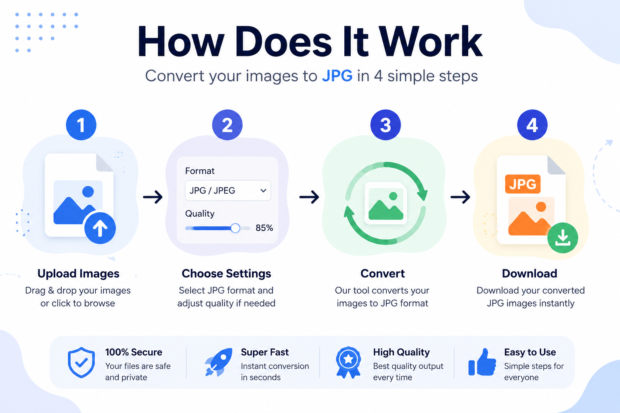
This kind of tool reads your source file, translates the pixel and color data into the JPEG format, and then compresses it based on a quality level you choose or one the tool sets by default. The result is usually a much smaller file that still looks close to the original.
Is any of this complicated to run yourself? Not really. You upload a file, the tool processes it in seconds, and you download the result. That’s the whole workflow on most sites, including the one above.
What file types can it convert to JPG?
Most online converters accept PNG, HEIC, WEBP, BMP, GIF, TIFF, and even PDF pages as source files.
PNG comes up most, especially from designers dropping a transparent background for a smaller file. HEIC is a close second, since every iPhone since iOS 11 saves photos that way by default, and plenty of Windows and Android apps still can’t open them without a fight. Back in 2022, I needed to combine jpg photos from a weekend shoot into one folder before a local print shop would even accept the order, and converting them first was the only way in.
Some people need the reverse job, going from JPG to Word so a scanned page becomes editable text instead of a flat image. That’s a different kind of conversion, since it reads text off the picture rather than just changing the format, but a lot of sites bundle it in as a separate option.
Why do people convert files to JPG instead of other formats?
People convert to JPG because it’s smaller, universally supported, and loads faster on websites and in emails.
Some of that comes down to plain history. JPEG has been around since 1992, so cameras, phones, browsers, and social platforms have defaulted to it for decades. That’s why it still shows up on the vast majority of websites today. If you’re building a site, running a blog, or just need something that opens on a ten-year-old computer, JPG is the safe choice.
How Do You Convert a File to JPG Online?
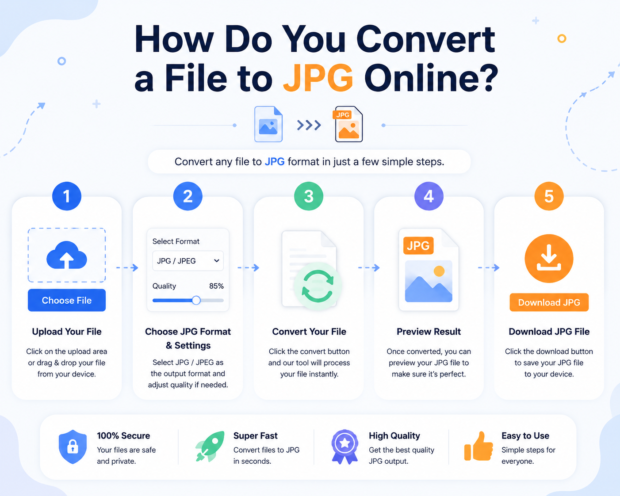
You upload the file to a browser-based converter, let it process, and download the finished JPG, usually without installing anything.
I switched to doing this entirely in the browser a few years back because desktop software felt like overkill for something this small. Now I do it from my phone half the time, in between job sites, since I shoot freelance photography on weekends. Once converted, you can always merge jpg files afterward using the same tool’s combine feature if you end up with several pages or shots to send at once.
Is it safe to convert files using a free online tool?
Yes, as long as the site runs on a secure HTTPS connection and deletes uploaded files after conversion.
It’s worth checking a tool’s privacy note before uploading anything sensitive, like a scanned ID or a signed contract page. Most reputable converters clear files from their servers within an hour or two.
How long does conversion usually take?
Most single image conversions finish in under 10 seconds, while batches of 20 or more files can take a minute or two.
What slows things down is the size and resolution of the original, not the tool itself.
How Do You Combine Multiple JPG Files Into One?
You upload the images, arrange them in the order you want, and export the result as one combined file, either a single stacked image or a multi-page PDF.
This is where people usually get tripped up, because converting and combining are two separate jobs. I learned that the hard way in 2024 when I tried to email a client 14 loose scans of a signed lease instead of putting them together first, and the whole message bounced back for being too messy to open. If you want to merge jpg online without downloading extra software, look for a tool that lets you drag files into order before exporting.
Can multiple JPG files become one PDF?
Yes, most converters that support combining will let you stack images into one PDF, which is the most common way people package several pages into one file for sharing or printing.
This works well for receipts, contracts, or scanned notebook pages. You upload each page as its own JPG, put them in order, and export one clean PDF instead of a folder full of loose images.
What’s the difference between converting and combining files?
Converting changes a file’s format, while putting several images together builds one single output file from many.
You might need both in one session. Say a scanner app saves five pages as PNG files. First, you’d convert each one, then use a JPG Merge online feature to stitch the pages into one PDF. Some tools handle both steps in a single pass, which saves you time.
Comparing a JPG Tool With Other Image Tools
Here’s how this kind of tool stacks up against the two options people most often confuse it with.
| Tool | What it outputs | Best used for | Effect on file size |
| JPG tool | A single .jpg image | Web uploads, email attachments, social posts | Usually shrinks the file significantly |
| PNG converter | A single .png image | Logos, screenshots, images needing transparency | Often increases file size versus JPG |
| PDF merger | One combined .pdf document | Contracts, scanned pages, multi-page reports | Depends on the compression used inside the PDF |
If small file size and broad compatibility matter most, JPG wins almost every time. If you need a transparent background, you’re stuck with PNG or WEBP no matter what. And if you’re pulling several pages into one document rather than one image, a PDF merger is the better final step once your images are already in JPG format.
Bring It All Together
A JPG converter isn’t complicated once you’ve used one a couple of times. Upload your file, pick a quality setting you’re comfortable with, and download the result. If you’re pulling several images into one document, look for a tool that handles combining in the same step instead of juggling two separate apps.
Go ahead and drop your file into the converter above and see how it looks. If the output isn’t quite right, bump the quality setting up a notch and run it again; it only takes a few seconds either way.
Common Questions About Converting to JPG
Does converting to JPG reduce image quality?
Yes, slightly, because JPG uses lossy compression that discards some pixel data to shrink the file.
At a high-quality setting, somewhere around 85 to 95 percent, most people can’t spot the difference with the naked eye. Drop below 60 percent and you’ll start seeing blotchy patches, especially around text or sharp edges. I keep mine near 90 for client photos and closer to 70 for quick drafts nobody but me will see. If your only goal is a smaller file rather than a format change, the same tool doubles as a JPG size reducer, since dragging that quality slider down is what actually shrinks the file.
Can I convert multiple files at once?
Yes, JPG and JPEG are the exact same image format, and the only difference is the number of letters in the file extension.
The shorter name exists because old Windows systems only allowed three-letter file extensions, so JPEG got trimmed down to JPG. Mac and Linux never had that limit, which is part of why both extensions are still floating around today.
Is JPG the same thing as JPEG?
Yes, JPG and JPEG are the exact same image format, and the only difference is the number of letters in the file extension.
The shorter name exists because old Windows systems only allowed three-letter file extensions, so JPEG got trimmed down to JPG. Mac and Linux never had that limit, which is part of why both extensions are still floating around today.